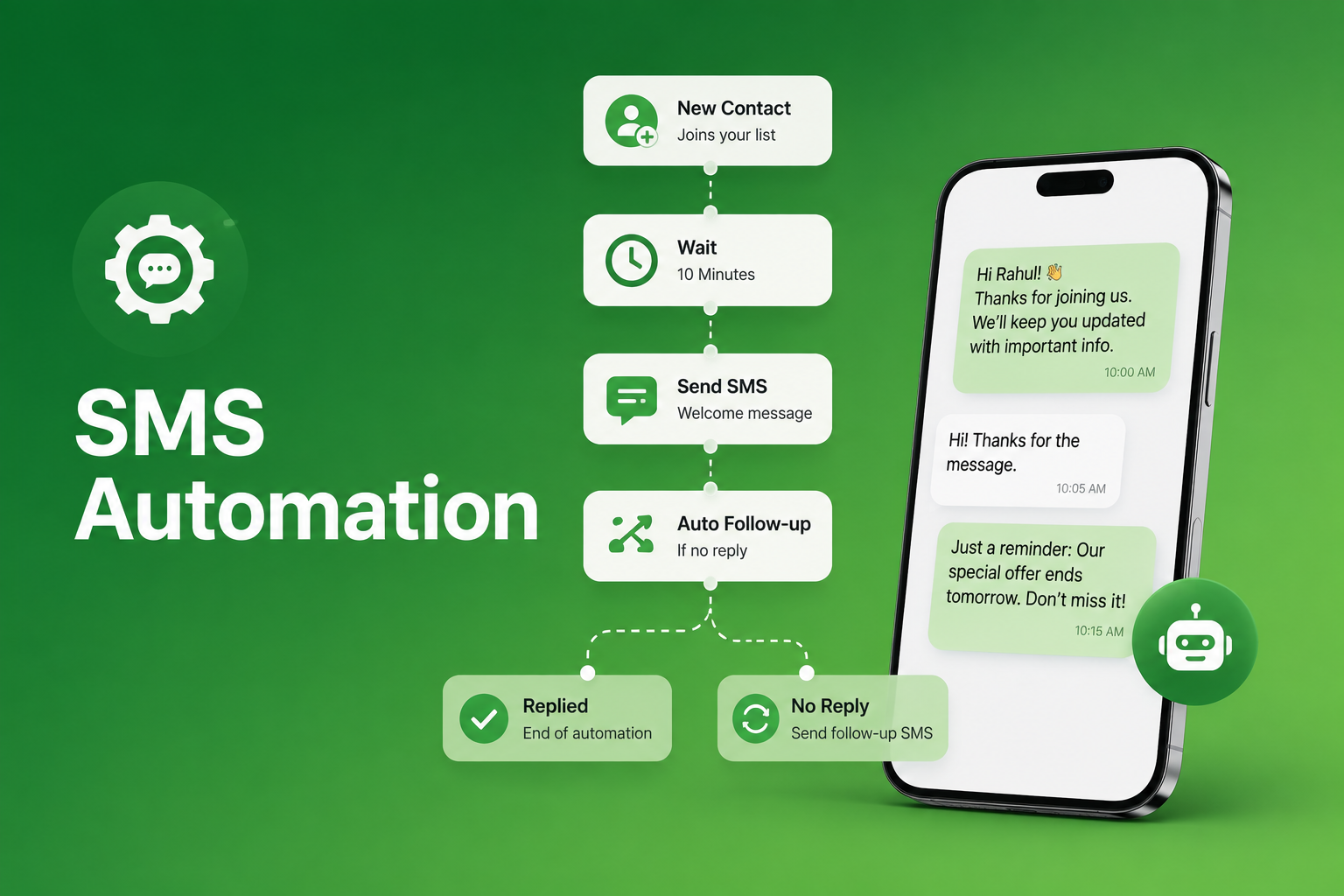
SMS automation examples are the fastest way to see where texting can replace manual work inside a business. Americans exchanged nearly 2.2 trillion SMS and MMS messages in 2024, 42 billion more than the year before, according to CTIA’s 2025 Annual Survey. Salesforce Research reports that 47 percent of customers want companies to resolve their issues faster, and text is the channel most teams already own. Automation closes the gap between those two facts. Instead of someone remembering to send a confirmation, a reminder, or a follow-up, a trigger sends it. The 12 workflows below cover the ones that save the most hours and the ones that drive revenue, along with how SMS automation works under the hood for each.
SMS Automation Examples That Save Operational Time
1. Appointment confirmation and reminder. A booking triggers an instant confirmation, then a reminder 24 hours out and a short nudge on the day. Clinics running patient reminder workflows recover the hours front desk staff spend calling. Ready-made appointment reminder text message templates cover most booking types.
2. Reschedule and no-show recovery. When a contact replies CANCEL or misses a slot, an automated message offers the next two openings. The reply lands in a shared inbox so a person only steps in when the customer needs something unusual.
3. After-hours auto-reply. Every inbound text outside business hours gets an immediate acknowledgement with your hours and a self-serve link. Customers stop repeating themselves in the morning, and nothing sits unanswered overnight.
4. Order, delivery, and service status updates. Status changes in your system push a text automatically. This is the single highest-volume use case for automated status alerts because it removes the “where is it” call entirely.
5. Payment and invoice reminders. A due date triggers a short notice with the amount and a payment link, followed by one polite escalation. Collections teams get a predictable cadence without chasing individual accounts.
6. Staff, shift and dispatch alerts. Groups receive schedule changes, route updates, or urgent coverage requests in one send. Transportation and logistics teams use this to reach drivers who never open email.
SMS Automation Examples That Convert Faster
1. Keyword opt-in with instant offer. A customer texts a keyword such as JOIN, and an automated reply delivers the welcome offer and confirms consent in the same message. The list grows, and the first sale happens without staff involvement.
2. Speed-to-lead first response. A new form submission fires a text within seconds naming the agent and the property, product, or service enquired about. Real estate teams win listings on this alone, and follow-up sales scripts keep the sequence consistent.
3. Abandoned cart and open quote follow-up. An unfinished checkout or an unsigned quote triggers a reminder after a set delay, then one final message with a deadline. Two touches usually outperform five.
4. Review and feedback requests. A completed job or visit triggers a request a few hours later, when the experience is fresh. Pairing the request with a thank-you message lifts response rates.
5. Win-back and re-engagement. Contacts with no activity for 60 or 90 days enter a short sequence with a reason to return. Restaurants and service businesses see the clearest lift here.
6. Renewal, refill and restock alerts. Recurring purchase cycles trigger a message timed to the reorder window. Because the timing is behavioural rather than promotional, opt-out rates stay low and personalised messaging performs better than a broadcast.
TCPA and 10DLC Rules Behind These SMS Automation Examples
Automation does not change consent obligations. Under the TCPA, marketing texts sent using an automated system require prior express written consent, and every contact must be able to revoke that consent at any time. The FCC’s telemarketing and robocall rules set out how consent and revocation are treated. Transactional messages such as confirmations and delivery updates fall into a different category from promotional ones, so keep the two message types in separate consent records and handle opt-outs separately.
US carriers also require A2P 10DLC registration for business messaging on standard 10-digit numbers. Registration ties your brand and campaign to a use case, and unregistered traffic gets filtered. Confirm your opt-in language matches the campaign you registered, since a mismatch is the most common cause of blocked automated sends. This is factual guidance, not legal advice.
How SendHub Runs These Automations
- Scheduled text messaging for one-time and recurring sends with time zone adjustment
- Text keywords that trigger auto-responses, opt-in confirmation, and STOP handling automatically
- Merge fields to insert names, dates, amounts, and appointment details into every message
- Templates that save your highest-performing messages for reuse across teams
- Two-way texting with a shared inbox so automated threads hand off cleanly to a person
- Groups and unlimited keywords for segmenting contacts by campaign, location, or department
- SendHub API to fire messages directly from your CRM, booking system, or custom software
- Analytics and reporting to track delivery, replies, and usage patterns per workflow
Frequently Asked Questions
It is the practice of sending texts automatically based on a trigger, schedule, or customer action. Consequently, no one has to send each message by hand.
Typically, appointment reminders and speed-to-lead replies show returns within the first month. Meanwhile, win-back sequences take longer to prove out.
Yes. Specifically, marketing messages sent by automated systems require prior express written consent under the TCPA, and revocation must always be honoured.
For business messaging on 10-digit US numbers, yes. Otherwise, carriers filter or block the traffic regardless of message quality.
Generally, two to four promotional messages a month are a safe ceiling. However, transactional messages like confirmations are not subject to the same fatigue.
Yes, through MMS. Additionally, attachments work well for menus, price lists, and appointment paperwork.
Usually mid-morning or early evening on the recipient’s local time. Furthermore, time zone adjustment prevents sends outside permitted hours.
Not for most workflows. Instead, keywords, schedules, and templates handle the majority, while an API covers custom triggers.
Track delivery, reply, click, and opt-out rates for each workflow separately. Then compare against your own baseline rather than industry averages.
No. Rather, it handles the predictable messages so staff spend their time on the replies that need judgement.
Yes. Because merge fields pull real names, dates, and order details, an automated message reads like a written one.